UPly · iPhone
Your own client work
- Client profiles, notes and working history.
- Today and follow-ups for your next action.
- Invoices and finance records beside client work.
- A practical starting point for independent operators.

Choosing your CRM workflow guide
Start with who owns the work, who needs the records and what happens after a customer says yes.
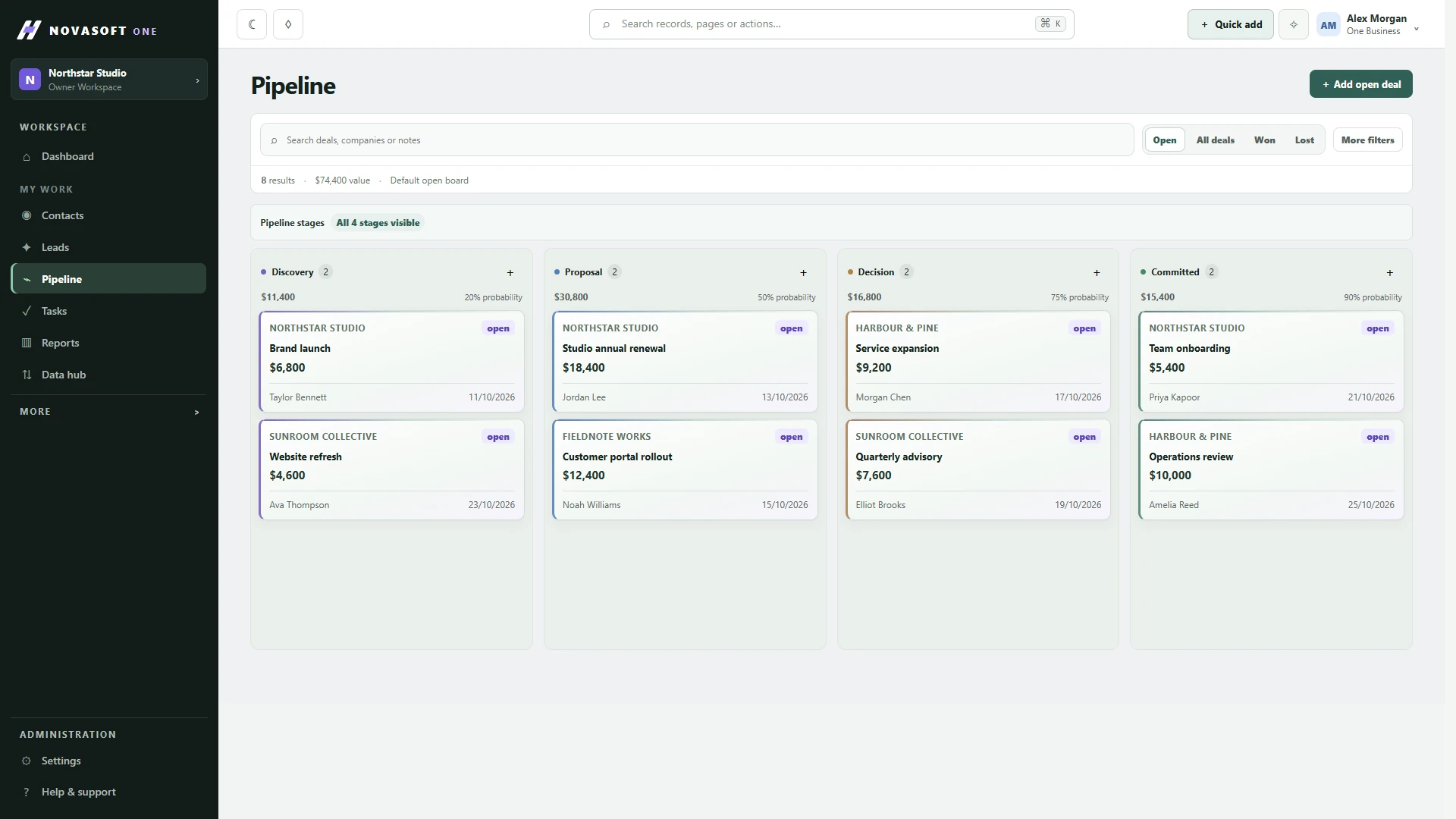
Write down one customer journey: how the enquiry arrives, what you record, how you follow up, how the work is agreed and what happens next. Identify each person involved. This quickly shows whether you need a personal client workspace, a shared CRM or a system built around specialist requirements.
UPly and NovaSoft One are both NovaSoft products, but they serve different working patterns. A solo operator may still need a broader CRM, and a small team may have simple requirements. Choose the workflow and access model that fits rather than using headcount as the only rule.
UPly · iPhone
NovaSoft One · shared team workspace
Review current App Store information for UPly and the live plans page for One. Availability, allowances and commercial details should be checked at the source when you make the decision.
UPly is available on iPhone and iPad for individual client work. NovaSoft One’s iPhone and iPad team app is coming soon; its web workspace is available now.
One’s mobile experience focuses on shared customers, pipeline, team tasks, service and assets. UPly focuses on your own clients, follow-ups, invoices and finances. A phone is a way to access the work; it does not make the two products interchangeable.
Review the One mobile app overview. Workspace functions and access follow the plan and the person’s permissions.
If you work from your iPhone and mainly need contact context, follow-ups and invoices, trial UPly against a few ordinary client relationships. Check whether your daily next actions are easier to see.
If sales, delivery and service need the same customer context, trial a shared journey in NovaSoft One. Check record ownership, access and the handover between people, using the functions in your chosen plan.
If your work involves unusual records, approvals or integrations, talk to us about a custom CRM, but check what a ready-made product can do first.
Use the same sample enquiry in each product you evaluate. Can you find the client, capture the relevant context, identify the next action and understand how work continues? If a colleague is involved, include their part of the handover. Use fictional or appropriately authorised sample data while evaluating.
Keep the essential requirements separate from preferences. A small successful pilot is a better basis for choosing than a long feature list that does not reflect your work.
Scroll sideways to compare all columns.
| Question | UPly | NovaSoft One |
|---|---|---|
| Who is doing the work? | An individual managing client work on iPhone. | People who need shared customer and workflow context. |
| Where will you use it? | iPhone and iPad for individual client work. | The web workspace now; iPhone and iPad app coming soon. |
| What should the trial prove? | You can find a client, see the follow-up and connect an invoice to the work. | Each person can find the record and complete their part of the handover. |
| What needs a cost check? | Current App Store purchase options and device requirements. | Current plan, user billing, implementation and any custom work. |
| What changes from the old tools? | Your personal client-working routine and any records you move. | Record ownership, access, shared processes and the migration scope. |
If the same customer details are being copied between people, test the shared journey in One. If you mainly need your own next actions on an iPhone, test UPly against a normal working day. See the One plan comparison when you need to choose a CRM tier.
A product choice today does not need to anticipate every future feature. Keep accurate records, agree your source of truth and review the available export or migration options before a later move. This comparison does not promise automatic UPly-to-One migration or that every record maps directly.
Yes, if the broader connected CRM workflow suits the work. Confirm the current plan and configuration you need.
No. Only go custom when a ready-made product genuinely can’t do what you need.
Keep exploring
For UPly, use a fictional client, one follow-up and an invoice you need to find on your iPhone. For One, use a fictional enquiry that one person takes and another person follows up. Ask the second person to explain what was agreed from the shared record.
Choose on the handover you need. One’s upcoming iPhone and iPad app keeps its team positioning; mobile access does not turn One into a personal invoicing app. Check UPly’s current Australian App Store purchase options and device requirements separately from One’s active-user billing.
For an Australian service or trade team, use the trade-business CRM checklist. If you also need a website, the One + Sites connection is coming soon; it cannot handle live enquiries yet.
Product support
Tell us the product and version, and what you’re trying to do.