
NovaSoft One setup guide
Set up your first team workflow in NovaSoft One
Follow one enquiry from first contact to delivery. Use the example below to check the records, people and handovers your CRM needs.
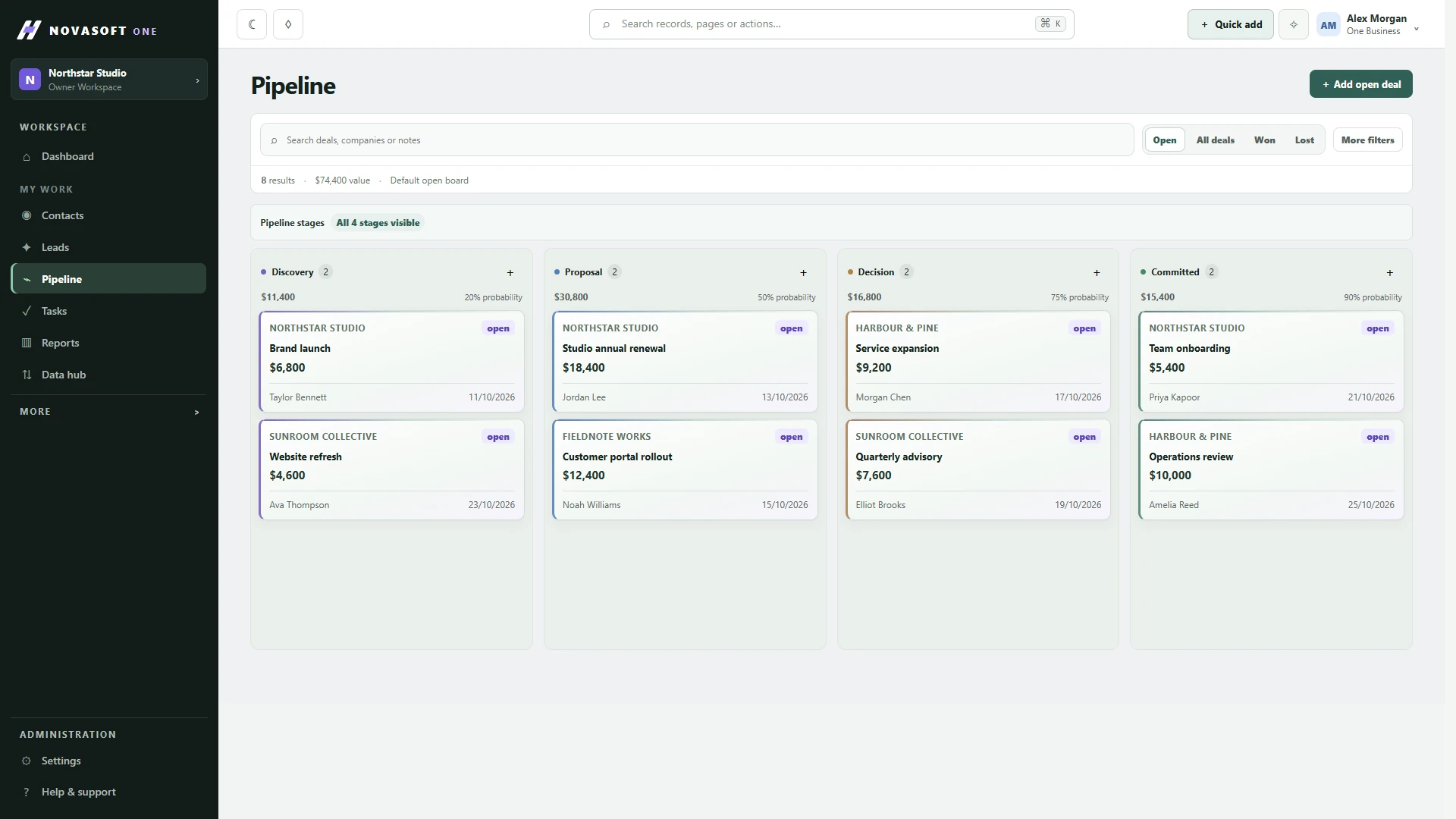
Choose the journey and check your plan
Start with a job your team handles regularly. For this guide, a fictional design business receives a website enquiry, sends a quote and hands the accepted work to a project lead. The example is a way to test your setup, not a report of customer results.
Use the functions in your workspace. Core customer and sales work can be evaluated first; projects and service need an appropriate paid plan. Review the current NovaSoft One plans before building a process around a feature. The One plan comparison explains what to look for.
Write down the sample record
Scroll sideways to compare all columns.
| Record detail | Example | Why it belongs in the CRM |
|---|---|---|
| Customer and contact | Northline Studio; Alex, the person approving the work | Connect the organisation with the person you need to speak to. |
| Request | A five-page website, with copy and images supplied by the client | Give the next person enough context to understand the enquiry. |
| Next action | Sam sends a draft quote on Thursday | Name the person and the action, rather than recording “follow up”. |
| Sales stage | New enquiry → scope agreed → quote sent → won or closed | Use stages that describe an actual business decision. |
| Delivery handover | Accepted scope, approval contact, agreed dates and outstanding content | Make the promises visible to the person delivering the work. |
These are information requirements. They do not imply that every example is a built-in field or that a won opportunity automatically creates a project. Check the records and workflow available in your plan before configuring anything.
Run the enquiry through the workflow
- Find or create the customer. Search first so an existing relationship does not become a duplicate. Check the contact details and which company the person belongs to.
- Give the opportunity an owner. Record the request and the next action. Agree who updates the stage and what must be known before it changes.
- Record the outcome of the quote. Keep the agreed scope and any changes with the customer context. If the customer declines, record the outcome instead of leaving the enquiry open indefinitely.
- Test the delivery handover. With the relevant project functions, check that the project lead can find the accepted work, contact, dates and unresolved questions. A link or handover should be reviewed; do not assume automation has completed it.
- Try an exception. Ask what happens if the customer changes the scope after acceptance. Record the decision and update the delivery commitment so sales and delivery agree.
Decide who maintains each part
Sam owns the enquiry and quote. Jordan owns delivery once the work is accepted. An administrator reviews the workspace configuration and user access. Your team may use different roles; the point is to make ownership clear at each handover.
Give each pilot participant one task to practise. Ask Sam to find the next action, Jordan to identify what was agreed, and the administrator to check the access actually available. If your requirements need advanced permissions or audit history, confirm the appropriate plan rather than assuming those controls exist everywhere.
Include mobile work in your evaluation
The iPhone and iPad app is coming soon. When it becomes available, include it in the same pilot as the web workspace.
Ask one person to find the shared customer history, another to review their assigned work, and a service user to check the ticket context available to them. Confirm notification permissions and the access each person actually has. The mobile app follows the workspace’s plan, roles and permissions; a preview screen does not mean every feature is included in every tier.
See the mobile app overview for the team workflow and availability.
Use an acceptance checklist
- The customer can be found without creating another record.
- The enquiry has an owner, a meaningful stage and a dated next action.
- The delivery lead can explain the accepted scope without asking sales to repeat it.
- A changed or cancelled job has a clear handling process.
- Each person can complete their task with the access they should have.
- The team agrees where updates belong and which system is the source of truth.
Write down each failed check, who will fix it and how you will retest it. A missing responsibility is often a process problem; adding another field will not resolve it on its own.
Move real records after the pilot works
Review a small, authorised sample before a larger import. Identify duplicates, missing details and how old records map to the new workspace. Agree who approves the result and how you will handle exceptions. Preserve the original source until the migrated records have been checked.
The CRM migration checklist covers preparation and validation. NovaSoft can also scope CRM implementation, migration and team training. An implementation project, custom development and ongoing support should each have a clear scope.
Questions that often come up
Should we automate the first pilot?
First prove the ownership, stages and handover manually. Then choose a repeatable task and define its trigger, result and exception handling before adding automation.
Does this replace our existing invoicing or accounting process?
No. This example checks a customer journey. Confirm your finance integrations and accounting requirements separately.
What should we do next?
Use the One plan comparison if you are still choosing a tier. If individual client work on an iPhone is your main requirement, compare UPly and NovaSoft One before planning a team rollout.
Related guides
Continue with the next decision
Talk to NovaSoft
Need help with the setup?
Tell us what you need to keep track of, who’s involved and what you use today.