
AT A GLANCE
- 01The conversation has a workspace
- 02Open the passage behind the answer
- 03Change a section, then review it
The conversation has a workspace
Orbit now has a standalone platform for working with documents, files and projects. You can ask a question in chat and inspect a source, edit a working document or review a project brief beside it. The current platform is a local development preview, with public launch coming soon.
Open the passage behind the answer
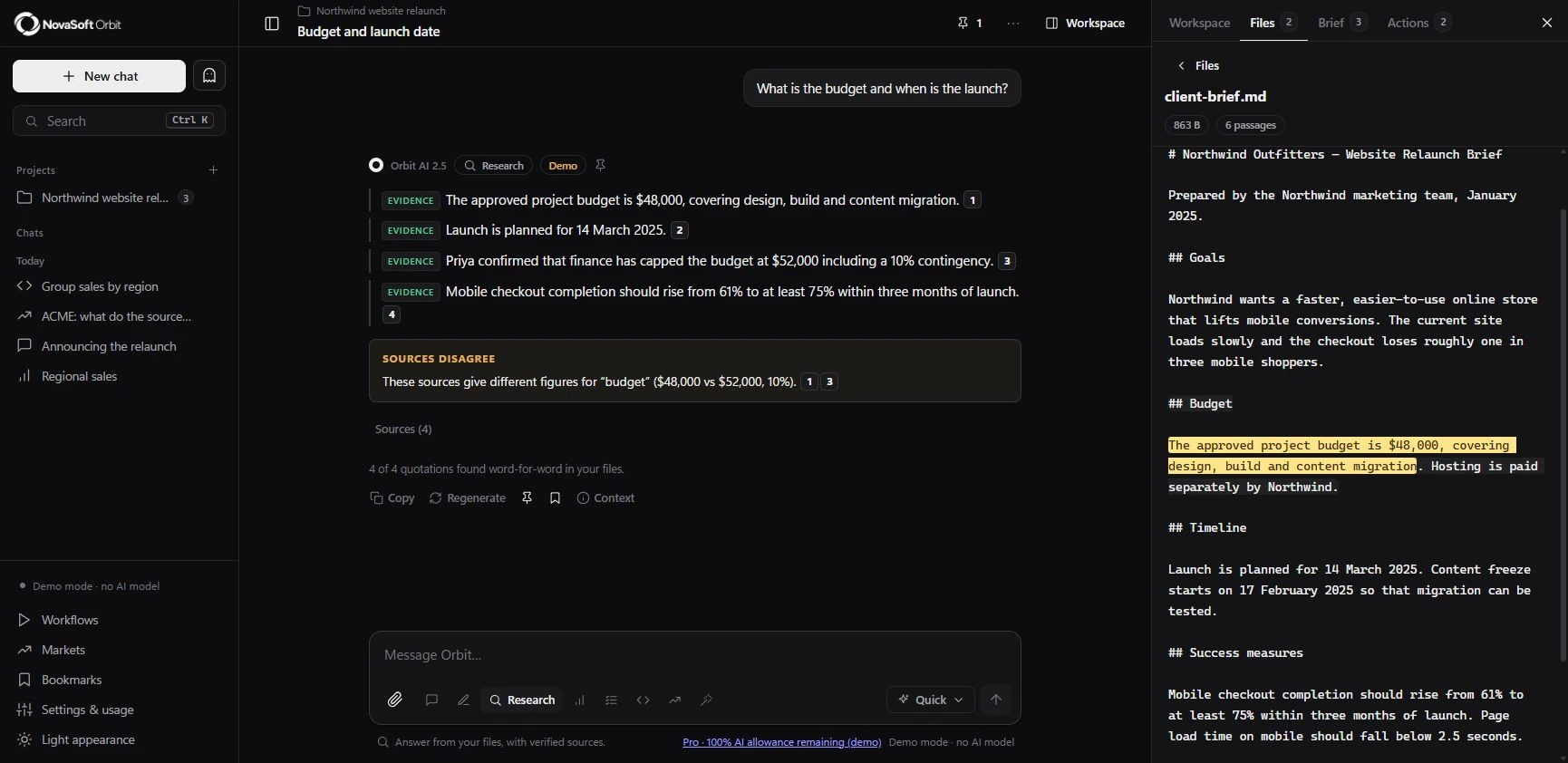
Research mode retrieves relevant passages and checks quotations word-for-word against the supplied file. Clicking a citation opens the original passage with the quoted words highlighted. The interface also separates evidence from inference and flags disagreements. Finding a quote proves that those words occur in the file; it does not prove the source or interpretation is correct.
Change a section, then review it
Writing happens in a workspace document with version history. Select a passage, request a revision and compare the proposed change before applying it. You can restore a previous version or export a document. This makes the output something you can work on, rather than a reply you have to copy elsewhere.
Carry the project forward
Projects keep files, chats and a reviewed brief of goals, decisions, open questions and next steps. Orbit can suggest brief updates, but you choose which to accept. Agent mode shows local tool calls as it searches, calculates or compares material. Existing documents change only when you apply the proposed edit.
What the preview tells us
The inspected app is in demo mode: its replies are scripted, while storage, search, citations, versions and local drafts work. Orbit AI 2.5 is the assistant’s product name and version, not a NovaSoft-trained foundation model. Live mode requires a configured external model and sends selected context to that provider. Public hosted access, subscriptions and One/Sites integration are not being announced as available.
TRY A WORKFLOW
Start with material you can check
- 01
Choose a small document with known answers.
- 02
Ask a question and open the cited passage.
- 03
Compare a proposed document revision before applying it.
- 04
Review suggestions before adding them to the project brief.
- 05
Check demo/live mode and data flows before using private material.
Common questions
Is Orbit publicly available?
Yes. Since this article was published, Orbit has launched on the web with Free, Starter and Pro plans. The native desktop apps are still in development.
Does Orbit connect to One or Sites?
The standalone preview does not connect to either product. Existing AI features in other products have their own scope and availability.
FURTHER READING
This platform guide is based on the current Orbit preview. These general AI resources from the earlier edition remain available: